BLOODMONEY Requiem Controls & How to Click
One-button booth play: where to click, when the shop matters, and what the Knife mash expects.
Control model in one sentence
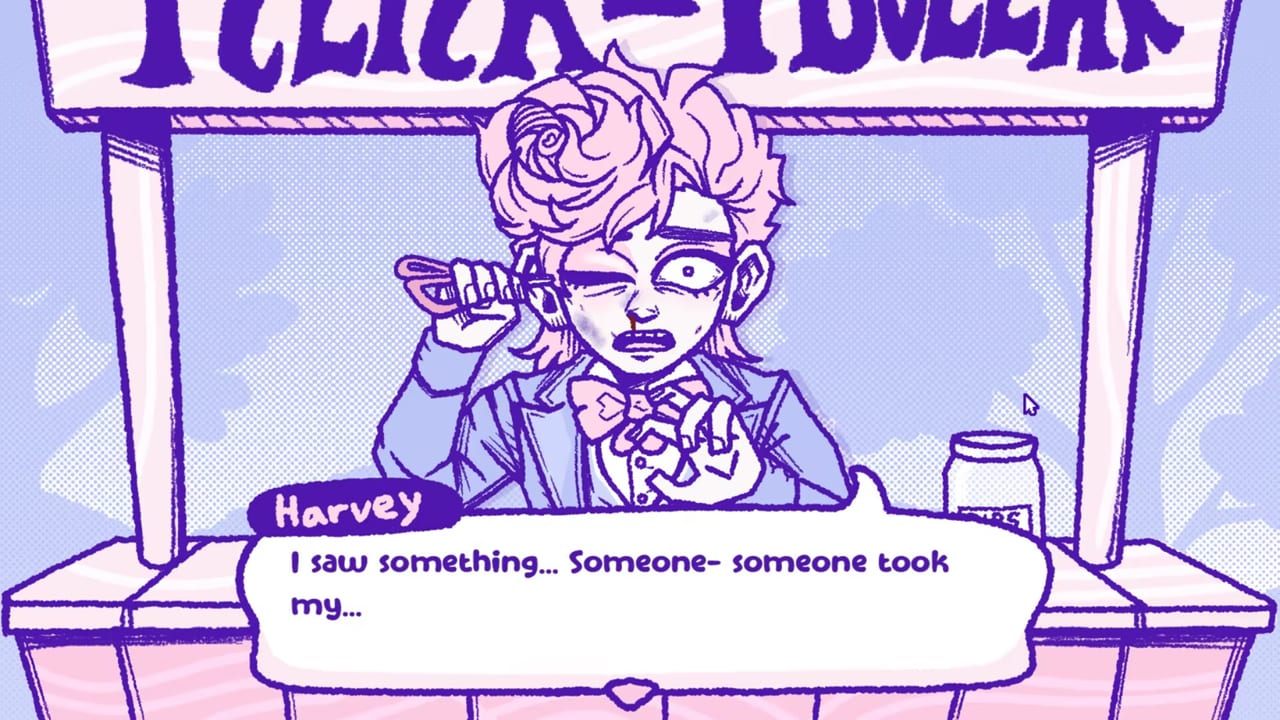
BLOODMONEY: Requiem is a point-and-click horror clicker / visual novel: you aim a mouse or trackpad cursor at Harvey (and UI buttons), press the primary click, and listen. There is no WASD movement set, no twin-stick dodge, and no complex ability bar. If you can open Steam and click a browser link, you already understand ninety percent of the scheme.
Release context: SHROOMYCHRIST Studios, Steam launch September 15, 2026, about $4.99, single-player, English audio/text/subtitles. Day-one loop: Getting Started. Shop ladder: Items & Shop. Mercy route: Good Ending. Specs and flashing-lights warning: System Requirements and Content Warnings.
Primary actions
Click Harvey
Harvey sits in the roadside booth. Left-click (or trackpad primary click) on him to earn money. Bare hands start at $1 per click. Each successful click is both economy and dialogue fuel—Harvey reacts, jokes, begs, or escalates depending on which tool you equipped from the shop.
Tips:
- Keep the cursor centered on his interactable body/portrait area; edge UI chrome is not the earn target.
- Rapid clicking works; the game is built around repetition.
- When scripted interruptions happen, stop spamming until the beat resolves, then resume.
Open and use the shop (upper left)
Watch the shop button in the upper-left of the screen. When it glows or otherwise signals a new offer, open it and review the next tool. Buying is a deliberate UI click, not an automatic upgrade. Closing the shop returns you to Harvey clicking.
Shop discipline matters more than click speed:
- Feather early is the intended first buy for almost every route.
- Scissors and later tools lock or reshape endings—see Items & Shop and Good Ending before “just browsing.”
- The Gun-tier checkout is an ending commitment, not a neutral DPS bump.
Advance dialogue / confirm prompts
Most story lines advance with a click on continuing UI or on Harvey when the scene expects input. Read before you mash through mercy runs; tone shifts are how the remaster telegraphs how far you have gone.
Knife QTE / mash moments
Late on the booth ladder, the Knife phase can interrupt the idle click loop with a reactive mash / QTE confrontation. Practical control notes:
- Keep your click finger ready; failing the mash is a documented Game Over, not a story ending.
- Trackpad users may prefer a physical mouse for burst click rate during the QTE.
- If you fail, reload an earlier state if the build allows, or restart the run—Game Over is not the Bad Ending (Bad requires buying and using the Gun on the remaster baseline).
Exact knife pricing and payout live on Items & Shop. Ending catalog: All Endings.
What you do not control
- No free roaming — the booth and campaign presentation move you; you do not walk a map with arrow keys.
- No multiplayer binds — single-player only; no shared multiplayer clicking.
- No “remove horror” accessibility preset advertised on the store — content warnings are the accessibility gate.
- No complex remapping required for the baseline experience — primary click plus UI buttons cover the design.
If a future patch adds remaps or toggle options, check Release Notes and Updates.
Accessibility & photosensitivity
Controls are simple; risk is visual and thematic, not mechanical difficulty.
- Read Content Warnings & Photosensitivity before marathon sessions.
- Steam’s line remains: do not play if you are photosensitive.
- Lower monitor brightness; avoid sitting nose-to-glass during ending spikes.
- Creators: warn before Knife and late-ladder footage even if chat begs for speed.
Hand / RSI note: mercy runs (especially Feather-leaning Good Ending grinds) mean many clicks. Stretch, use a comfortable mouse, and take breaks. The remake markets longer sessions than the short 2025 shock.
Auto-clickers and Feather Good grinds
Community players sometimes use auto-clickers for long Feather / light-tool Good Ending grinds to reduce repetitive strain. This wiki’s stance:
- It is a personal choice on a single-player narrative title.
- Respect Steam Subscriber Agreement / ToS and any developer statements—do not treat this page as permission to violate platform rules or to harass others about their method.
- Auto-clicking does not bypass ending locks. Buying Scissors still breaks remaster Good. Tool caps still matter (Good Ending).
- On Requiem’s remake path, a Feather-only plan can be nudged toward a forced Hammer buy—automation will not erase that story gate.
- We do not host trainers, injectors, or exploit scripts. See the Tools Hub design principles.
If you automate, still watch dialogue. The point of a mercy run is listening, not only topping $25,000 while AFK forever.
Input devices & Steam Deck
| Device | Expectation |
|---|---|
| Mouse | Ideal for click rate and Knife mash |
| Trackpad | Fully playable; QTE bursts are harder |
| Controller | Not the primary design metaphor; if Steam Input maps click, verify shop UI aim yourself |
| Steam Deck | Compatibility unverified on this wiki at writing—check ProtonDB / Steam Deck reports and your own install before promising handheld clarity |
Storage is tiny (~200 MB). Spec jokes aside, any typical Windows 10-class Steam PC should run the clicker; see System Requirements.
Suggested practice order
- Launch, read warnings, click Harvey until the shop glows.
- Buy Feather; confirm upper-left shop open/close feels natural.
- Decide mercy versus escalation before mid-ladder tools (Ending Path Planner).
- If you climb to Knife, treat the QTE as a separate skill beat—pause stream overlays if they eat clicks.
- After credits, compare outcomes on All Endings without blaming “controls” for a shop purchase you chose.
Related pages
- Getting Started — first five minutes and early mistakes
- Good Ending — allowed tools and grind expectations
- Items & Shop — costs, payouts, ending impact
- System Requirements — install baseline
- Content Warnings — flashing lights and themes
- Tools Hub — other helpers
Master the one-button loop, then spend your attention on conscience—not on hunting a missing jump key that was never part of Harvey’s booth.
Frequently Asked Questions
Quick answers about endings, tools, and the Requiem remake.
What are the basic controls in BLOODMONEY: Requiem?
Point and click. Use the mouse or trackpad to click Harvey for money and to operate shop/dialogue UI. There is no complex movement scheme.
Where is the shop button?
Upper left. Open it when it signals a new tool, buy deliberately, then return to clicking Harvey.
How does the Knife QTE work?
Late Knife play can force a reactive mash / confrontation. Fail it and you get Game Over, not a story ending. A mouse often handles burst clicking better than a trackpad.
Are auto-clickers allowed for the Good Ending grind?
Some players use them for repetitive Feather-style grinds as a personal comfort choice. Follow Steam ToS and developer rules; auto-clicking does not bypass Scissors locks or remake story gates. This wiki does not provide clicker software.
Does Requiem run on Steam Deck?
This wiki has not verified Deck controls or Proton behavior. Check community Deck reports and test shop UI aim yourself before assuming a perfect handheld port.